A few weeks ago Apple has it’s “Spring Forward” event and it was live streamed on Apple website. You can watch the stream in HD below and download it for FREE!
REMEMBER: DO NOT REBROADCAST THIS EVENT WITHOUT APPLE’S PERMISSION.
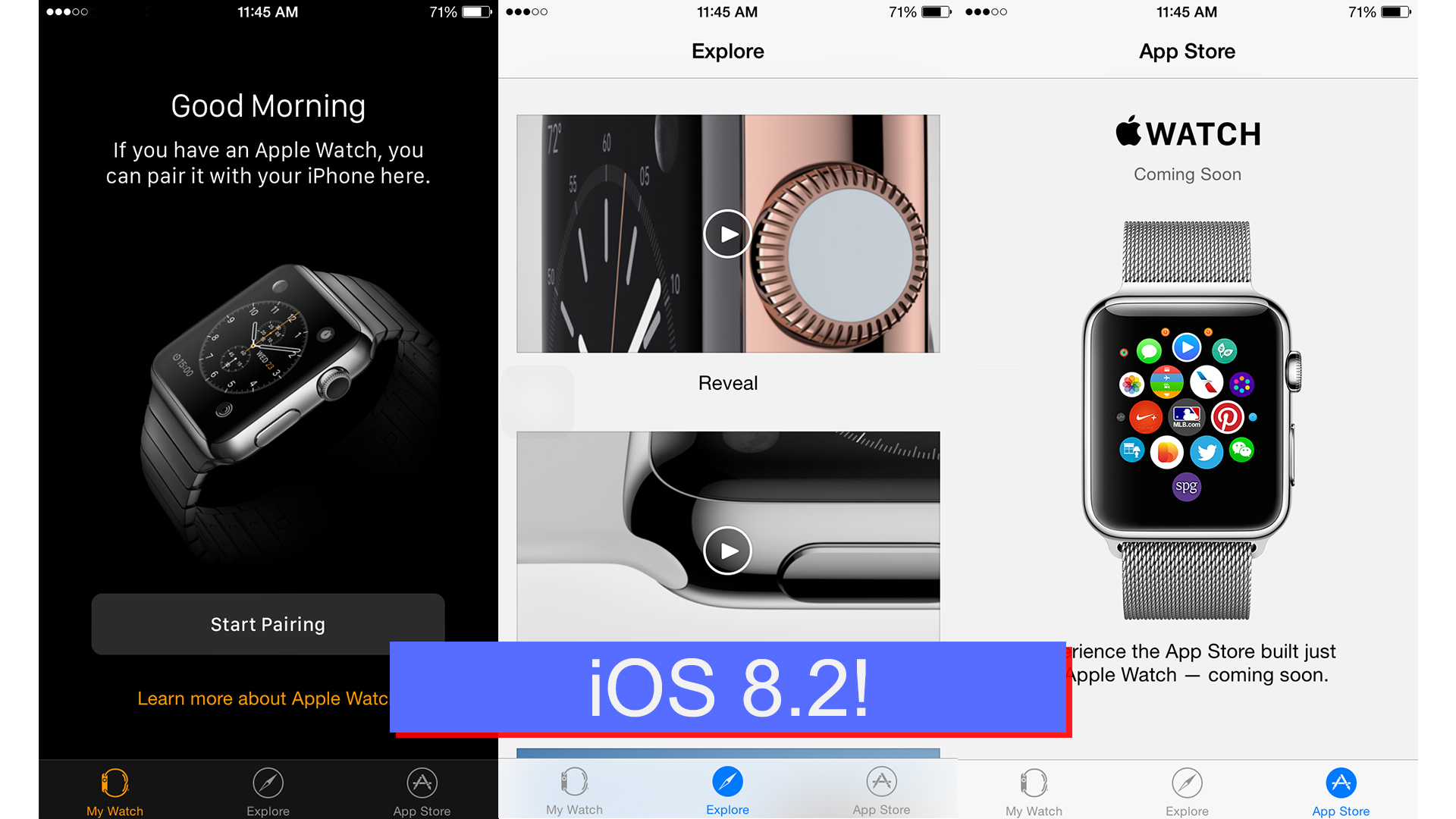
Just this morning Apple sent out the iOS 8.2 update it’s users and it includes a “Apple Watch” app that allows you to pair your phone to your watch and download apps for the watch!
Currently the “App Store” tab is “Coming Soon”! Other then that you have a explore tab – Which has a bunch of promotion videos of the Apple Watch. The most important tab is the “My Watch” tab. When you are connected to the internet and you Bluetooth is on you can connect to your watch by pointing that camera at it or by choosing the watch from the list.
The “Apple Watch” app can’t be deleted just the “Apple Store” and the “iTunes Store”.
[mks_separator style=”solid” height=”5″]
[mks_button size=”small” title=”More About the Apple Watch” style=”rounded” url=”http://ddshdyt.com/2015/03/08/apple-watch/” target=”_blank” bg_color=”#ffd700″ txt_color=”#0a0a0a” icon=”” icon_type=””]
Just a few hours ago, Apple had it’s March 2015 Spring forward event where they announced price drops, new partnerships, a new Macbook, and more details on the Apple Watch.
Then Apple went on how it’s going to help with medical research by announcing “ResearchKIT” which allows developers to create app to faster get survey on health problems. This helps researchers find cure for health issues much faster. Doctors can also use this technology to send notification to it’s patients who are using it’s app.
Apple is also working with many research companies to get this technology out into the hands of patients who have severed health problems such as Breast Cancer etc..
https://www.youtube.com/watch?v=VyY2qPb6c0c
After taking a bunch about “ResearchKIT” – They went on to talk about their Macbook line and brought the new Macbook. It’s hasn’t been branded as the MacB. Pro or the MacB. Air it’s just a new product line called the “Macbook“.
This new Macbook is for the looks and not for how it performs or how much it costs. It’s a super-thin laptop. Because of this there are only two I/Os. One a USB-C port that is both for charging and a standard USB 3 port (Can only do one at a time unless you have the Apple adapter).
The other I/O is a standard four pole 3.5 mm port.
When we said “Super-thin” we mean’t it.. It’s just 13.1 mm at this thickest and because of this the USB-C port was one of the compromise that were made. The other two are the new keyboard and the trackpad.
https://www.youtube.com/watch?v=5-e7NFINJas
[mks_pullquote align=”left” width=”200″ size=”24″ bg_color=”#ffd700″ txt_color=”#ffffff”]Apple Watch[/mks_pullquote]
Apple then went onto something that we all were expecting which is the Apple Watch.
We already knew a lot about the watch such as the colors, bands, and the models but, today we got the pricing, the release date and more..
Apple talked about some of the stuff that we already but, they announced “WatchKIT” with which developers can create that apps for the watch. The watch also has a new included app with iOS 8.2 “Apple Watch” with which you can download apps for the watch, themes and change settings. The watches are available in both 38mm and 42mm case. They also gave us the price:
[mks_tabs nav=”vertical”]
[mks_tab_item title=”Sport”] $349 or $399
[/mks_tab_item]
[mks_tab_item title=”Regular”] $549 or $599
[/mks_tab_item]
[mks_tab_item title=”Edition”] $10,000+
[/mks_tab_item]
[/mks_tabs]
NOTE: You will need an iPhone device that is newer then the iPhone 5 and running iOS 8.2 or above.
You will be able to pre-order all of these models starting April 24th 2015!
Discover has been a long time in the working and now it’s ready! Now snapchat is not just a messaging service – It’s now also a media destination. Once you have updated to 9.0.0 version of Snapchat – The discover feature is just a swipe away from the Story.
Discover has photos, videos and text from some big brand news services live CNN… Most of the coverage in Discover is powered by ads. So far snapchat not been making much money so, Discover is snapchat ‘big money maker’!
Snapchat has always celebrated the way that you and your friends see the world. It’s fun to experience different perspectives through Snaps, Stories and Our Story.
Today we’re introducing Discover.
Snapchat Discover is a new way to explore Stories from different editorial teams. It’s the result of collaboration with world-class leaders in media to build a storytelling format that puts the narrative first. This is not social media.
Social media companies tell us what to read based on what’s most recent or most popular. We see it differently. We count on editors and artists, not clicks and shares, to determine what’s important.
Discover is different because it has been built for creatives. All too often, artists are forced to accommodate new technologies in order to distribute their work. This time we built the technology to serve the art: each edition includes full screen photos and videos, awesome long form layouts, and gorgeous advertising.
Discover is new, but familiar. That’s because Stories are at the core – there’s a beginning, middle, and end so that editors can put everything in order. Every edition is refreshed after 24 hours – because what’s news today is history tomorrow.
Discover is fun and easy to use. Tap to open an edition, swipe left to browse Snaps, or swipe up on a Snap for more. Each channel brings you something unique – a wonderful daily surprise!
Just now apple has sent out a iOS update: iOS 8.1.3! This update mainly includes minor bug fixes!
As far as the jailbreaking status for this update (iOS 8.1.3) goes it’s unknown.
Here is the official update information from Apple:
This release includes bug fixes, increased stability and performance improvements, including:
Reduces the amount of storage required to perform a software update
Fixes an issue that prevented some users from entering their Apple ID password for Messages and FaceTime
Addresses an issue that caused Spotlight to stop displaying app results
Fixes an issue which prevented multitasking gestures from working on iPad
Adds new configuration options for education standardized testing.
For information on the security content of this update, please visit this website: http://support.apple.com/kb/HT1222
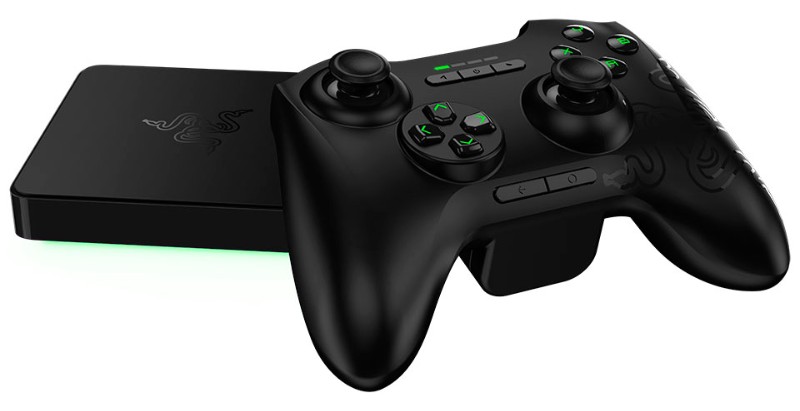
Yesterday we taked about the Obox a handheld gaming console run by Android. The Ouya didn’t get really big. The Ouya was also a $99 dollar Android running gaming console. The Razer Forge is also a $99 Android running console that connects to the TV. The Razer Forge is which is really small at 4×4 inches!
Alongside the Forge, Razer also unveiling a line of other products – a couple of Bluetooth-based peripherals. The Serval gaming controller and the Turret keyboard and magnetised mouse; the Nabu X, a “basic alternative” to its Nabu smartband – They will sell for as cheap as $20 to registered Razer Insiders and it will be $50 to others. A new VR headset was also there in conjunction with other hardware manufacturers.
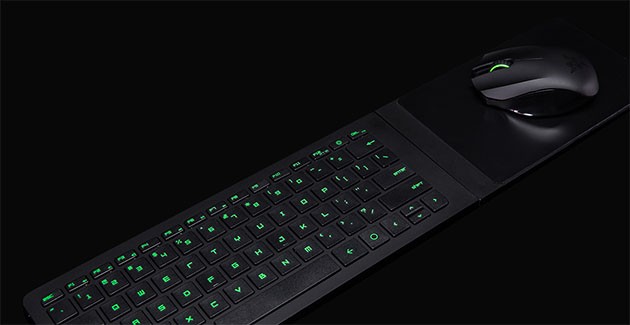
Keyboard
They also have this wireless keyboard with a a flipable and magnetic mouse pad – This can hold the mouse included.
Mouse
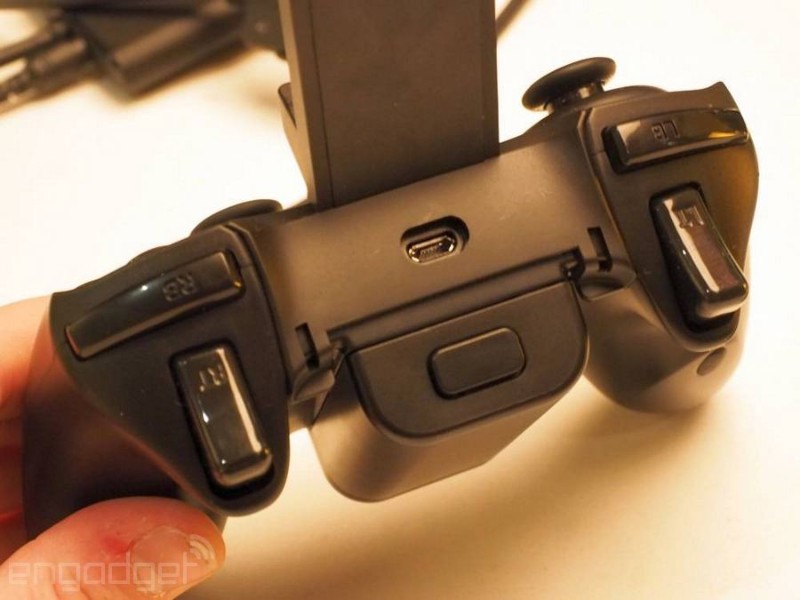
The mouse is about the same – almost same as all the other console controllers. The layout is also the same! There is also a clip on top of the controller that can hold your mobile device.
There is also Cortex: Stream which uses Wi-Fi low-latency streaming from a source that is a lot more powerfull then a cheap Android console – like your PC.
Specs:
quad-core Snapdragon 805 CPU
Adreno 420 GPU
802.11ac WiFi
Bluetooth 4.1
2GB RAM
16GB of storage
Google Play Games & Cortex: Stream
https://www.youtube.com/watch?v=D_A1gyYRTgc
We are trying to get our greddy hands on this as soon as possiable but, until then – Check out this video from LinusTechTips.
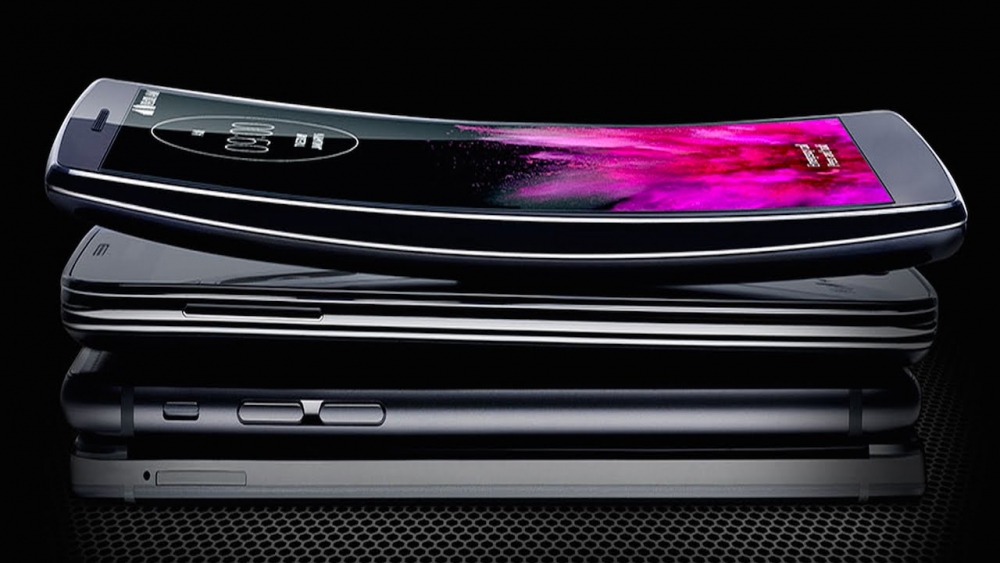
We have all wanted that phone that you can safely “bend” the phone. The LG G flex 2 is just that! It’s just like the LG G FLEX 1 and LG G3 but, you can step on it!
Just like the last one this one also as “self-healing” backing which makes light scratches on the phone disappear in seconds! The buttons are also still at the back. The phone is available in tow colors: the classic Platinum Silver, and the eye-catching Flamenco Red!
I have gotten a lot of questions from my family and friends on how they can get free gift cards without doing some sketchy hacking or doing something illegal – for the most part there was nothing like that.
That all changed when I found these two services and I just could wait to tell you guys about them – so here it is.
Both of these services have the same concept – download a free from their list and earn points then exchange those points for gift cards or other stuff like prepaid phone services cards or memberships. It’s not that hard either you can usually earn one dollar gift cards in less than five app downloads – this depends on what apps you download.
Both of these services are available on Android and iOS.
[hr]
The first service is called FreeMyApps – It’s awesome.
FreeMyApps offers a variety of apps to download from – most of the apps that give you a lot of points you just download and open and use the app for 30 seconds. Most of the apps that give you less points you just open them.
The most important part of these services is the rewards you get – there are a variety of them to choose from.
The second service is called FeaturePoints – It’s well good.
FeaturePoints also offers a variety of apps to download from but, most of the apps don’t give you a lot of points you also just download and open and use the app for 30 seconds. FeaturePoints also has a bunch of rewards to choose from but, the amount of points your earn are little to the amount of points you need to buy the rewards.
A few days ago apple “pushed out” iOS 8.1.2 Over The Air (OTA) with bug fix, More info.
Usally when Apple send out an update it usually closes any loop holes or exploits but, It turns out that this time that is not the case. The iOS 8.1.2 jailbreak was out almost immediately after the release!
[hr]
Disclaimer
We DO NOT take any responsibility for any harm you do to your device {iPod Touch/iPhone/iPad} during this process.
[hr]
Requirements / Before We Start
Your device {iPod Touch/iPhone/iPad} must be running the latest (As of now) firmware: iOS 8.1.2. (Check Below)
You mustdisable passcode and Find my {iPod Touch/iPhone/iPad}. You can re-enable these later.
Signing out of iCloud will not work, You must sign-in to iCloud and than, Disable Find my {iPod Touch/iPhone/iPad}.
You will also need a Windows 7 or up based computer for this update to work (As of now). For Mac users: You can run Windows on a virtual machine or Boot Camp.
Must have the latest version of iTunes (Check Below)
[hr]
Download
TaiG v1.2.0: [button url=”http://apt.taig.com/installer/en/TaiGJBreak_EN_1201.zip” style=” Grey ” size=”small” type=”square” icon=”icon-download” target=”_self”] Windows (47.7 MB) [/button] [button url=”https://filetea.me/t1smHBPEqMxR5mVZM0GU2w9Lw/dl” style=” red ” size=”small” type=”square” icon=”icon-download” target=”_self”] Windows (47.7 MB) – Fast Download [/button]
[button url=”http://www.apple.com/itunes/download/” style=” Grey ” size=”small” type=”square” icon=”icon-download” target=”_blank”] Download iTunes[/button] (You don’t have to enter an email).
Update to the latest version of iOS via OTA or manually with the corresponding iPSW found on our Downloads page.
[hr]
Guide to Jailbreak
(Recommended) – Back-up and then Restore your device {iPod Touch, iPhone, iPad} to a fresh version of iOS 8.1.2 . Don’t Restore from Backup just yet! You can do that after the jailbreak process is over.
Plug-in you device {iPod Touch, iPhone, iPad} and open iTunes (If it doesn’t already).
After iTunes opens – Trust the computer on you device {iPod Touch, iPhone, iPad} and your computer.
If you haven’t already remove passcode and Disable Find my {iPod Touch, iPhone, iPad}.
After downloading the files mentioned above, Extract the ZIP files using the build-in zip extractor – To avoid problems.
Run the “TaiGJBreak_EN_1201” EXE file and Un-check the “3K Assistant” Option.
After you have carefully completed all the steps, Click jailbreak and don’t touch your device {iPod Touch/iPhone/iPad}, Don’ttouchit even when the “Storage is almost full” alert comes up. Most important – Don’t unplug it.
Your device {iPod Touch, iPhone, iPad} will reboot and you should then have Cydia!
Last very important step: Open Cydia and let it finish updating it’s file system, If you close Cydia or reboot at this point than, You will have to restore your device {iPod Touch, iPhone, iPad} and do this all over again. Also, After that’s done update all the packages.
You are now done! You device {iPod Touch, iPhone, iPad} is now jailbroken! Have fun and Be Safe!