

Author: Dhrumil Shah
I do tech.

Mac Mini 2014?


Linksys EA6300 AC Dual band Gigabit Wi-Fi Router | Unboxing and Overview
Comment blow if your want a review of the router!
In this video I unbox and take a closer look at the Linksys EA6300 AC Dual band Gigabit Wi-Fi Router. Linksys EA6300 is a gigabit ac wireless router capable of handling ac speeds and has four gigabit ports!
Get the router yourself: http://amzn.com/B00C0WZ9FW
–
Follow Me:
Twitter: https://twitter.com/ddshdyt
Google+:
FaceBook: https://www.facebook.com/ddshdyt
Website:
Subscribe It’s Free!!:
Intro Track: Champagne by Savant
Background Music:
“Early Riser” Kevin MacLeod (incompetech.com)
Licensed under Creative Commons: By Attribution 3.0

Argentina vs. Germany | FIFA World Cup 2014 Final


UPDATE | Next iPhone maybe the most flexible and durable smartphone with it’s front panel made out of sapphire!
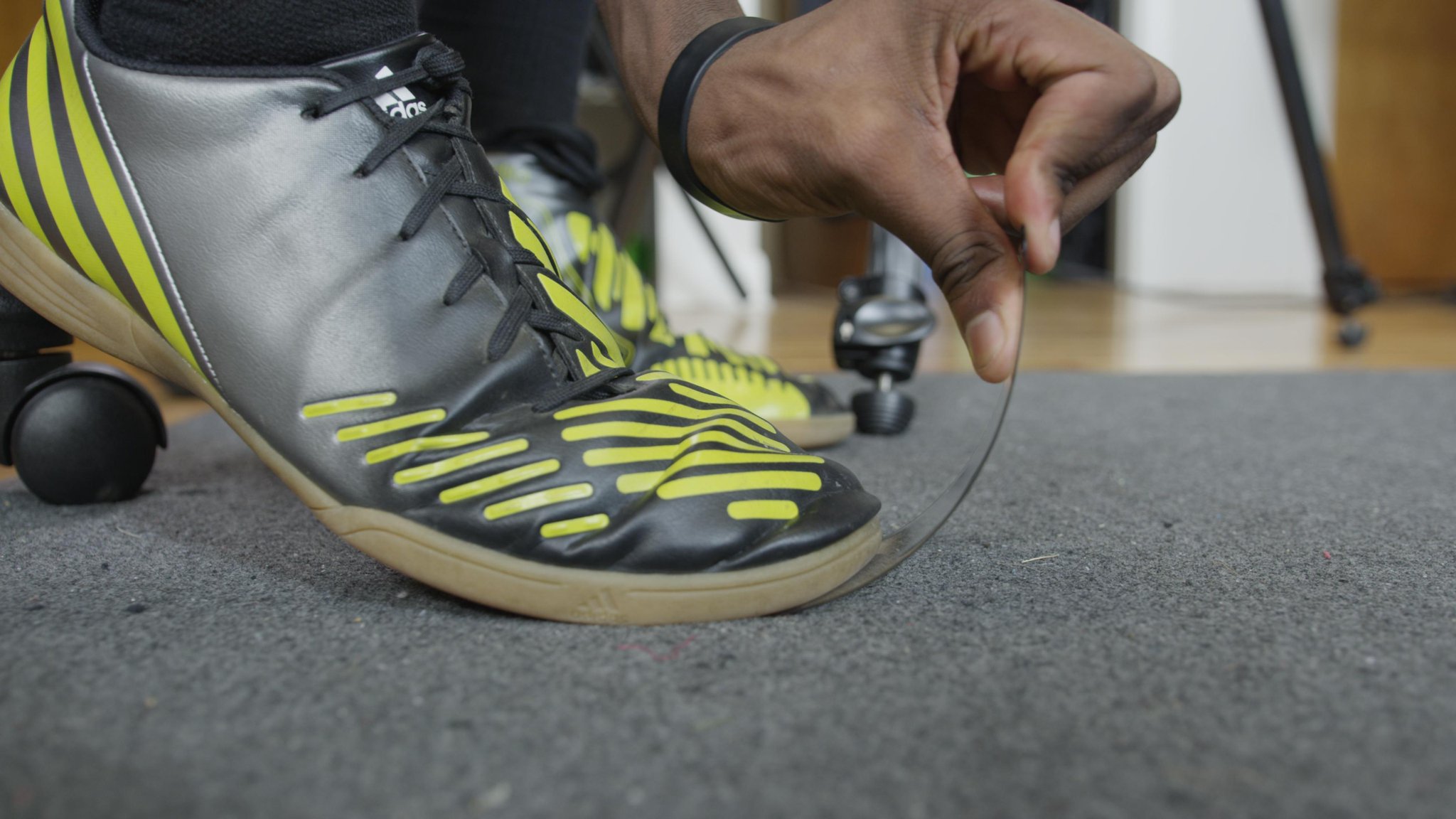 |
| Marques Brownlee extremely bending the sapphire glass! |
SCROLL DOWN TO SEE THE UPDATE
Well it might not be “flexible” because of the other components but, it could be really durable.
After a long recent months of iPhone 6 leaks. Though there is not much of a conformation if this is a actual part off the assembly line. This is suppose to be closest we can get to a look at the screen of the next generation iPhone.
Marques Brownlee; A YouTube tech celebrate and Sonny Dickson; Know for leaking smartphone parts. Uploaded a video (embedded below) today showing off a sapphire front screen of the next generation alleged 4.7 in. iPhone 6 and show just how durable it is.
The new Sapphire glass screen on the iPhone 6 looks great, guys. Prepare to be amazed! $GTAT $AAPL
— Sonny Dickson (@SonnyDickson) July 4, 2014
Even though we never got a conformation that Apple was working on a Sapphire screen but, the leaks in the past form 9to5Mac and other sources that Apple had procured enough Sapphire Crystal furnaces to make 100-200M ~5-inch iPhone displays.
The new iPhones models are expected this fall, likely in September, alongside the release of iOS 8.
Be sure to watch the whole video where Marques Brownlee does a extreme “torture test” for the sapphire screen.
Marques Brownlee’s Video
Sonny Dickson’s Video
UPDATE:
Another video upload from Marques Brownlee (Linked Below) shows that leaked front panel glass is not pure sapphire by scratching it with sandpaper (Results shown in the video)


Jailbroken on iOS 7.1.1? Is it safe to update to iOS 7.1.2?

Apple recently published the iOS 7.1.2. More information here. Some people have recently jailbroken their device on iOS 7.1.1 and now they want to know if it is safe to update to iOS 7.1.2 and keep the unteatheed jailbreak?
The answer is YES! And you can do it RIGHT NOW!
7.1.2 is live and yes, http://t.co/R6FhChhJPN will jailbreak it OTB… https://t.co/04Tj8GWul3
— iH8sn0w (@iH8sn0w) June 30, 2014
Video and Written tutorial from iDownloadBlog!
Windows
Video Tutorial
Written Tutorial
Step 1: Download Pangu 1.1 for Windows from our downloads page
Step 2: Plug your iOS 7.1.x device in to your computer’s USB port
Step 3: Open Pangu_v1.1.exe on your Windows machine. You may see a blue error box. If so, click more info and click Run Anyway (see video tutorial for more information). The Pangu app should open.
Step 4: Once your device is detected by the app, click the Start Jailbreak button
Step 5: Pangu will ask you to go to Settings > General > Date & Time and disable the Set Automatically toggle. You will then need to set the date to June 2, 2014
Step 6: Once the date is set, the jailbreak process will begin automatically. After a little while, Pangu will ask you to open the Pangu app icon on the Home screen of your iOS device. Tap the Pangu icon to launch the Pangu app and tap the Continue button
Step 7: The jailbreak will continue process. You will be asked to unlock your device after it reboots
Step 8: Once the jailbreak is completed, you should see Cydia on your Home screen
Congratulations. You now have an untethered jailbreak on iOS 7.1.x using your Mac. Pangu should automatically set your date setting in Settings > General > Date & Time back to Set Automatically
Mac
Video Tutorial
Written Tutorial
Step 1: Download the latest version of Pangu for Mac OS X from our downloads page
Step 2: Plug your iOS 7.1.x device in to your computer’s USB port
Step 3: Open Pangu.dmg on your Mac and double click the Pangu icon to run the app
Step 4: Once your device is detected by the app, click the Start Jailbreak button
Step 5: Pangu will ask you to go to Settings > General > Date & Time and disable the Set Automatically toggle. You will then need to set the date to June 2, 2014
Step 6: Once the date is set, the jailbreak process will start automatically. Eventually Pangu will ask you to open the Pangu app icon on the Home screen. Tap the Pangu icon to launch the Pangu app and tap the Continue button
Step 7: Wait patiently, and the jailbreak will continue process. You will be asked to unlock your device after it reboots
Step 8: Once the jailbreak is completed, you should see Cydia on your Home screen
Congratulations. You now have an untethered jailbreak on iOS 7.1.x using your Mac. Pangu should automatically set your date setting in Settings > General > Date & Time back to Set Automatically

iOS 7.1.2 Just came out!

Apple just pushed out iOS 7.1.2 update to all iOS 7 compatible devices!
Continue reading iOS 7.1.2 Just came out!

Apple launches 16GB iPod touch 5th generation with all the colors and back camera for $199.99

Apple recently announced 16GB iPod touch 5th generation with more colors and a front and a back facing camera (Unlike before). A few months ago Apple released a 16GB iPod with only a front facing camera and only available in a White (Silver).
Now you can get a iPod touch 5th generation starting at $199.99 with all the colors and both camera! The prices for the 32 GB and 64 GB model have also fallen. The 32 GB model now costs $249 (down from $299) and the 64 GB model costs $299 (from $399), a significant $100 drop.
These new price points aren’t particularly shocking or unprecedented since we have seen better prices for both models within the past couple of months. Staples ran a 1-day sale that yielded the 32GB iPod touch for $224 and the 64GB iPod touch for $299. Also, the new retail prices have prompted Apple to drop refurbished prices. The 32GB model is now $199 (down from $219) and the 64GB model is now $239 (down from $299). The 16GB model without a rear camera is now just $149 refurbished (down from $189).

This now means there is only a $50 difference between storage sizes, unlike iPads and iPhones which go up in $100 increments.
Now the only difference between all three models is the price.
16GB for $199; 32GB for $249; 64GB for $299
With a $50 upgrade from the 16GB model you can get double the store and for another $50 you can get triple the storage of the 16GB model.
Source: Apple