
Author: Dhrumil Shah
I do tech.


Wanna earn free gift cards? Legally? Here is how to do it!
[no_toc]
I have gotten a lot of questions from my family and friends on how they can get free gift cards without doing some sketchy hacking or doing something illegal – for the most part there was nothing like that.
That all changed when I found these two services and I just could wait to tell you guys about them – so here it is.
Both of these services have the same concept – download a free from their list and earn points then exchange those points for gift cards or other stuff like prepaid phone services cards or memberships. It’s not that hard either you can usually earn one dollar gift cards in less than five app downloads – this depends on what apps you download.
Both of these services are available on Android and iOS.
[hr]

The first service is called FreeMyApps – It’s awesome.
FreeMyApps offers a variety of apps to download from – most of the apps that give you a lot of points you just download and open and use the app for 30 seconds. Most of the apps that give you less points you just open them.
The most important part of these services is the rewards you get – there are a variety of them to choose from.
There is literally nothing bad about these services just Click Here and get started!
[button url=”/freemyapps” style=”orange” size=”large” type=”square” icon=”” target=”_blank”] FreeMyApps [/button]
[hr]

The second service is called FeaturePoints – It’s well good.
FeaturePoints also offers a variety of apps to download from but, most of the apps don’t give you a lot of points you also just download and open and use the app for 30 seconds. FeaturePoints also has a bunch of rewards to choose from but, the amount of points your earn are little to the amount of points you need to buy the rewards.
That is the only thing bad about this service but overall it’s still good – Click Here to get started!
[button url=”/featurepoints” style=”blue” size=”large” type=”square” icon=”” target=”_blank”] FeaturePoints [/button]

The Full story about how Sony got hacked by “North Korea” and pulled back it’s upcoming movie “The Interview”
The Story
[hr]
Before we start If you don’t already know – The Interview is movie about assassinating a North Korean dictator.
About a month ago Sony was hacked by #GOP who called themselves the Guardians of Peace after the FBI was pulled in the investigation… I am getting ahead of myself self here – let’s start from the beginning.
The hackers thretened Sony that If they don’t met the requests they made by a certain date than they will release some zip files all named SPEData.zip along with Internal data and “Top Secrets” to the world.
Sony does not met the requests that the were making and sure enough they release the data! The leaked information includes source quality images and videos form it’s upcoming move “The Interview”. That wasn’t the scary part of the story – The scary part is that they released personal information of ‘all’ employees of Sony. This information included social security numbers, full names, birth days, phone numbers and even more information. A brave Sony employee who decided to give FORTUNE a interview and according to that conversation it looks like it got pretty crazy over at Sony. People didn’t just start changing passwords to their bank accounts and online shopping services some of them also started getting new passports!
While that was going on in an employees life – Sony got FBI into this hacking and the hackers confidently “laughed at the FBI” and identified themselves as the Guardians of Peace also –
“The result of investigation by FBI is so excellent that you might have seen what we were doing with your own eyes. We congratulate you success,” GOP wrote. “FBI is the BEST in the world.”
“You will find the gift for FBI at the following address,” they said, posting a YouTube link to a Japanese prank video that repeats a phrase: “You are an idiot.”
FBI on Friday (Have no-idea what the date was at this point) said that North Korea is behind this attack – North Korea has denied this.
-

One the first images from the hackers.
Earlier this month the #GOP threatened that if this movie was shown at any theaters than there will a 911 like attack at those location – They also warned the people living in those area to leave during the time this film is shown. Most of the major theaters started dropping the film to avoid terrorist attracts and future possible hacking. After most of the major theaters drooped that film Sony decided to pull that film from all theaters.
Barack Obama said and I am paraphrasing here that Sony should have talked to them before taking the action of pulling back the movie itself and that they would take some action to this. Again I have paraphrased here and none of those are official quotes.
https://www.youtube.com/watch?v=2oo2-0xvCZ8
NBC video about how Sony “made a mistake” in pulling back the movie “The Interview”
Now we come to yesterday morning – North Korea disappears from the internet and timing was perfect and now everybody thinks that the US is behind the attack.The country has limited web infrastructure in the first place and Dyn shows that the country has had major outages in the past 24 hours. Anyone at a North Korea’s IP has found it impossible to connect to the internet.
“I haven’t seen such a steady beat of routing instability and outages in KP before,” said Doug Madory, director of internet analysis at Dyn Research
/cdn0.vox-cdn.com/uploads/chorus_asset/file/2870752/141222-dyn-570x489.0.png)
The North Korea might have had their turn at turn to control the United States by censoring a movie across the ocean in the United States and It succeeded for the one and the last time. We are not afraid of a dictator somewhere else and that’s the reason that your are going to be able to watch “The Interview” this Christmas – The best day of year!
Breaking news: Sony has authorized screenings of THE INTERVIEW on Christmas Day. We are making shows available within the hour. #Victory
— Tim League (@timalamo) December 23, 2014
12/26 to 1/1 times will come out tomorrow for THE INTERVIEW
— Plaza Atlanta (@PlazaAtlanta) December 23, 2014
It’s a great day in America. pic.twitter.com/NKDet4uy0O
— Dave Itzkoff (@ditzkoff) December 23, 2014

[hr]
Sources

HOW TO: Jailbreak iOS 8.1.2 Untethered!

Untethered Jailbreak iOS 8.1.2 on all devices!
A few days ago apple “pushed out” iOS 8.1.2 Over The Air (OTA) with bug fix, More info.
Usally when Apple send out an update it usually closes any loop holes or exploits but, It turns out that this time that is not the case. The iOS 8.1.2 jailbreak was out almost immediately after the release!
[hr]
Disclaimer
We DO NOT take any responsibility for any harm you do to your device {iPod Touch/iPhone/iPad} during this process.
[hr]
Requirements / Before We Start
- Your device {iPod Touch/iPhone/iPad} must be running the latest (As of now) firmware: iOS 8.1.2. (Check Below)
- You must disable passcode and Find my {iPod Touch/iPhone/iPad}. You can re-enable these later.
- Signing out of iCloud will not work, You must sign-in to iCloud and than, Disable Find my {iPod Touch/iPhone/iPad}.
- You will also need a Windows 7 or up based computer for this update to work (As of now). For Mac users: You can run Windows on a virtual machine or Boot Camp.
- Must have the latest version of iTunes (Check Below)
[hr]
Download
- TaiG v1.2.0: [button url=”http://apt.taig.com/installer/en/TaiGJBreak_EN_1201.zip” style=” Grey ” size=”small” type=”square” icon=”icon-download” target=”_self”] Windows (47.7 MB) [/button] [button url=”https://filetea.me/t1smHBPEqMxR5mVZM0GU2w9Lw/dl” style=” red ” size=”small” type=”square” icon=”icon-download” target=”_self”] Windows (47.7 MB) – Fast Download [/button]
- [button url=”http://www.apple.com/itunes/download/” style=” Grey ” size=”small” type=”square” icon=”icon-download” target=”_blank”] Download iTunes[/button] (You don’t have to enter an email).
- Update to the latest version of iOS via OTA or manually with the corresponding iPSW found on our Downloads page.
[hr]
Guide to Jailbreak
- (Recommended) – Back-up and then Restore your device {iPod Touch, iPhone, iPad} to a fresh version of iOS 8.1.2 . Don’t Restore from Backup just yet! You can do that after the jailbreak process is over.
- Plug-in you device {iPod Touch, iPhone, iPad} and open iTunes (If it doesn’t already).
- After iTunes opens – Trust the computer on you device {iPod Touch, iPhone, iPad} and your computer.
- If you haven’t already remove passcode and Disable Find my {iPod Touch, iPhone, iPad}.
- After downloading the files mentioned above, Extract the ZIP files using the build-in zip extractor – To avoid problems.
- Run the “TaiGJBreak_EN_1201” EXE file and Un-check the “3K Assistant” Option.

- After you have carefully completed all the steps, Click jailbreak and don’t touch your device {iPod Touch/iPhone/iPad}, Don’t touch it even when the “Storage is almost full” alert comes up. Most important – Don’t unplug it.
- Your device {iPod Touch, iPhone, iPad} will reboot and you should then have Cydia!
- Last very important step: Open Cydia and let it finish updating it’s file system, If you close Cydia or reboot at this point than, You will have to restore your device {iPod Touch, iPhone, iPad} and do this all over again. Also, After that’s done update all the packages.
You are now done! You device {iPod Touch, iPhone, iPad} is now jailbroken! Have fun and Be Safe!
[hr]
Video
[hr]

iOS 8.1.2 – Minor bug fixes for iOS 8
iOS 8.1.2 the fifth patch for iOS 8 and second for iOS 8.1 was “pushed out” to all iOS 8 devices this afternoon!
This looks like a really minor fix which solves the problem of purchased ringtones to “disappear” from the device. If you want to restore these ringtones than go to “Restore Tones“.
[hr]
Official update note from Apple
This release includes bug fixes and addresses a problem where ringtones purchased through the iTunes Store may have been removed from your device. To restore these ringtones, visit itunes.com/restore-tones from your iOS device.
For information on the security content of this update, please visit this website:
http://support.apple.com/kb/HT1222

Amazon Fire Stick: A Chromecast and a Roku Stick rival?
Overview
Even though Amazon was late to the steaming box game, That isn’t going to stop Amazon from innovating. First Amazon comes out the Fire TV and now it has come out with the Fire Stick. The Fire Stick is cheaper than the Roku’s Streaming Stick and it’s just a bit more expensive from Google’s own Chomecast. The Fire Stick can do ‘every’ and ‘anything’ the other two can.
The Fire Stick comes around at just $39 sharp and if you are a Amazon Prime subscriber than this is a must buy, If you are not already into another Streaming Box ecosystem.
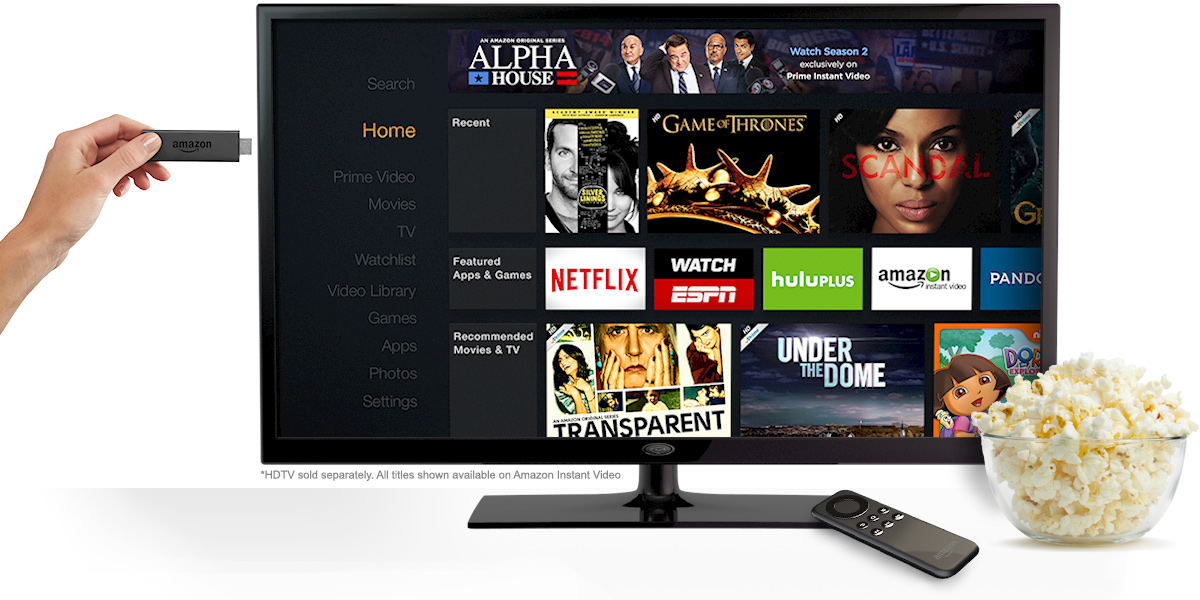
The First stick comes with Amazon’s menu – including all of the Prime streaming content, if you are a subscriber. Just the Roku Streaming Stick it can using most (but not all) of the third-party streaming services natively – None of that casting stuff from your phone like the Chromecast.
[hr]
Interface
Amazon says that the interface will be the “same” as it’s bigger sibling the Fire TV. This interface will be very important because, You will need to get used to this interface if you are going use most the major video streaming services – As of now Netflix, Hulu Plus, YouTube, Crackle, Twitch, and Pandora are all available but, HBO GO isn’t expected to come til 2015. All services are able to be played upto 1080p, Depending on your internet speed and bandwidth. Full list of Apps and Games are here!
[hr]
Conclusion
Most media company’s have already released their reivews and the link to those are below:



[hr]


MCV shows why the Xbox One is so big!
[hr]
Even though the Xbox One has the same if-not lower speced hardware than the PS4 – It still manages to be larger in size. One of the Xbox designer tells MCV why the Xbox One is larger than the PS4.
According to the forum post on LinusTechTips and the same topic discussed on TheWanShow (November 28, 2014 ). After reviewing IGN and MCV’s post – It seems like the Microsoft made the Xbox One larger in size to avoid ‘red ring of death’ issues.
You can read the full posts linked: IGN & MCV
[hr]
[highlight] Here is the clip from TheWanShow of Nov. 28th 2014 – Watch the whole segment before accusing someone or some company about what they said. [/highlight]
Source: IGN, MCV, LinusTechTips

iOS 8.1.1 brings stability and performance updates!
An iOS update (8.1.1) was pushed out to iPhone 4s and later, iPod touch (5th generation) and later, iPad 2 and later
today with the following bug fixes:
This release includes bug fixes, increased stability and performance improvements for iPad 2 and iPhone 4s.
UPDATE: According to [highlight]ArsTechnica[/highlight] these are the types of speed improvements:
| APPLICATION | IOS 7.1.2 | IOS 8.0 GM | IOS 8.1.1 |
|---|---|---|---|
| Safari | 1.25 seconds | 2.16 seconds | 1.85 seconds |
| Camera | 1.5 seconds | 1.8 seconds | 1.84 seconds |
| Settings | 0.95 seconds | 1.25 seconds | 1.2 seconds |
| 0.91 seconds | 1.30 seconds | 1.33 seconds | |
| Messages | 1.73 seconds | 1.83 seconds | 1.79 seconds |
| Calendar | 0.8 seconds | 1.25 seconds | 1.23 seconds |
| Cold boot | 36.4 seconds | 39.8 seconds | 38.2 seconds |
Source: [highlight]iOS 8.1.1 Release Notes[/highlight]

Instagram is allowing you to edit your post captation after the fact.
Latest Instagram upldate now allows you to edit your Instagram Photo or Video caption.
To edit the information on your Instagram photo or video just follow the following five (5) steps!

- Tap the three dotted button (as shown)
- Tap “Edit”
- Change or Add information such as: Caption, Location, Tags etc.
- Tap done (As shown)
- Now You’re done!
Now the only request the we have right now if twitter typo correction.
If only twitter allowed tweet changes after the fact
Things overdue in 2014: …Correcting Twitter typos.
— Marques Brownlee (@MKBHD) November 10, 2014

