Reserve Windows 10 ahead for priority and faster update!

If you have Windows 8, 8.1 installed in your computer then you will see a windows icon in your taskbar near the time and date area.

GETWIN10-FEATIMG

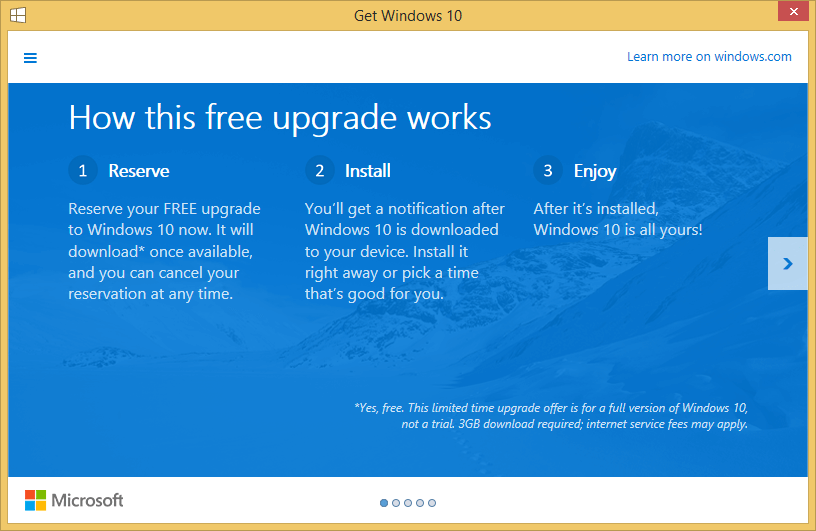
Once you get it just click on it and it will have this pop-up window:

Get Windows 10 1

Once you click next it will ask you to enter an email and after clicking next you have reserved Windows 10 for yourself!

Get Windows 10 2

By doing this it will “guarantee” that you can get the update with a priority when the servers are being hammerd during the initial release. This way you can be one of the first people to get Windows 10!

This text will crash the iPhone it’s sent to!

A bug in iOS 8 will crash whoever’s people it’s send to.

This trick only works on iOS 8 with an iPhone and iMessage.

This bug is with the notifications and whenever someone gets the notification of the text it will crash and reboot their phone.

Send this to anything you want with iOS, iPhone & iMessage.

لُلُصّبُلُلصّبُررً ॣ ॣh ॣ ॣ

You can save yourself by turning off iMessage or using “Do Not Disturb” (Not getting notifications).

Sprint LTE rolling out in Roanoke, Vinton, Salem and Bedford VA! and more… (Charleston)


May 9th 2016 – UPDATE
Shentel has finished the deal to buy nTelos.
Click Here.

November 21st 2015 – UPDATE
Confirmed Sprint LTE in the areas has just been launched! Click Here.

November 19th 2015 – UPDATE
Shentel has aggregated to buy nTelos.
Click Here.


Just today the coverage page for Sprint has been updated to include 4G LTE service. The map now shows that there is 4G LTE coverage in Roanoke, Parts of Vinton, Salem and Bedford. All of the voice and data services are provided by nTelos and the agreement that we talked about here is confirmed!
Hopefully the new 4G LTE nework from Sprint/nTelos in Virgnia and West Virginia could get it some more customers!

We are still trying to get an opportunity to test out the 4G LTE speeds. Just to clear things up: This is not Sprint Spark, a Verizon XLTE competer because again the service is provided by nTelos and they do not have the right to put in Sprint Sprak towers.

The 4G LTE service is also added to some W. VA markets like Charleston, Princeton and other W. VA markets.

LTE for the area come more than 2-3 years after Verizon and ATT have already has their LTE! Roanoke, VA was also one of the first area to get XLTE from Verizon.

The coverage is still increasing and once we actually test out the service we will provide you with how it works!

You can check the coverage map for yourself here: http://coverage.sprint.com

YouTube’s 10 year anniversary is marked with unicorns, cats and double rainbows!?

YouTube is celebrating it’s 10 year anniversary the way we know it. YouTube has chosen 26 of it’s best moments of videos from A to Z! It’s also spreading them though out May – A letter a day.

On YouTube 300 hours of video is being uploaded every minute compared to the first video that was uploaded to YouTube by it’s co-founder Jawed Karim – “Me at the zoo” which was only 18-seconds.

YouTube was founded on February 14th 2005 in an apartment above a Japanese restaurant. The idea for YouTube was born after the creater couldn’t find footage of 2004 Indian Ocean tsunami and other events. In 2006 YouTube was purchased by Google for only $1.68 Billon.

YouTube is also ranked #3 Globally and #4 in the U.S. on the famous site ranking site Alexa.

But, this is how YouTube puts it’s self:

YouTube is a portrait of our global culture, seen through the lenses and perspectives of people around the world. It is a portrait built by a creative community of bold and fearless individuals. Built by comedians, gamers,activists, artists, performers, teachers, and pranksters. Built with cats and rainbows and blenders and ninjas and unicorns. It was built on the silly. It was built on the profound. It was built by you.

Of-Course you can’t forget that we are also on YouTube and are making great tech content!

[mks_button size=”large” title=”Source: YouTube Trends” style=”rounded” url=”http://youtube-trends.blogspot.nl/2015/05/celebrating-10-years-of-youtube.html” target=”_blank” bg_color=”#dd3333″ txt_color=”#FFFFFF” icon=”fa-share-square-o” icon_type=”fa”]

WWDC 2015 is a thing! June from 8th to the 12th!

Like all the past years Apple is having a event for it’s developers. This year it’s from June 8th to June 12th. Like every year we should expect everything that’s coming from Apple in the following year.

We are also expecting some new hardware refreshes like a new Apple TV.

The Event will be live on the Apple website along with being rebroadcasted by major news sources.

There is not much to say until we get closer to the dates. We will definitely have a video right after the event so stay tuned!

[mks_button size=”medium” title=”WWDC 2015″ style=”squared” url=”https://developer.apple.com/wwdc/” target=”_blank” bg_color=”#ededed” txt_color=”#0a0a0a” icon=”” icon_type=””]

TP-Link TL4010 Powerline Kit – Unboxing and Review

If you search Amazon.com for a powerline KIT then the TP-Link TL4010 will be one of the first listings. The TP-Link is a powerline kit with a lot going on but, for a not-steep price.

If you buy the kit then you get both the adapters, a pair of CAT-5 cable and all the documentation. The adapters have a glossy finish with that surprising does a good job at not attracting fingerprints but, does attract dust pretty quickly. Both of the adapter also have three leds – First (Power), Second (If an device is connected to the other end) Third (Blinks if data goes through).It’s actually surprising that you get a CAT-5 cable at this point it’s really rare to find a CAT-5 cable and I would recommend changing that out with CAT-5e so you get the best performance as possible.The setup preocess for the kit was really easy – if just pluged one end into the wall outlet (without a powerstrip or a extender) connected the ethernet cables and the same or the other end. They found each other on it’s network instantly without even pressing the pair button.At a glance the spec sheet does not look that great with only a 10/100 ethernet port but, in actual use with the client also using a 10/100 ethernet – It was able to reach 93 Mbps on my 120 Mbps connection. The transfer speeds which they advertise to be 500mbps but, I also somehow only 115 mbps within the network. There were not bottlenecks in our testing for this test. Everything in the test was gigabit except for the adapter.One of the reason that you shouldn’t take as a granted what the product as says is true. Even though they might say that it can reach 500 Mbps you always have to look at what the ethernet port is certified at. Your maximum internet speed will not be anything more then that certification. A good way to find this is too look at what the ethernet port certification says – The last number in that spec is the max speed. Often written as:  10/100/1000/10000… (Ex. 10/100 in this adapter mean 100 max speed).Both the adapters are the exact same things so it doesn’t matter which on you use as the “sender” or the “receiver”. If you want to add more adapters then just buy the adapter twice or buy only one of them. Any adapters that you add to the whole mesh network will be used as hubs so the speeds will be shared between them.

This powerline kit is perfect for not having to go through the walls – you can just use the existing house electrical wiring as an ethernet cable. This works great for connecting PCs wired to the network or extending you WiFi coverage buy putting a router at the “receiver” end instead of a PC.

TP-LINK TL-PA4010 AV500 Nano Powerline Adapter, Up to 500Mbps, Plug and Play, Power Saving Mode

nTelos will no longer serve customers in Eastern Virginia.

Starting November 15th 2015 all nTelos will no longer have service in Eastern Virginia.

nTelos has said that they are starting to move their attention to other areas and will be stopping service in Eastern Virginia.

Don’t worry though – All nTelos contacts in this area will be released from all contacts on September 30th 2015 or Earlier (If requested). This way all customers can move onto another network. You do not have to have a ETF (Early Termination Fee for moving to any carrier.
You don’t make the change just yet – You can stay on nTelos and keep your service but starting June 15th 2015 your data speeds will be decreased and after Nov. 15th you won’t have any service.

If you do want to switch then nTelos has made it ready with a partnership with Sprint who will give nTelos customer a deal.

nTelos customers will get a $100 switching bonus for switching to Sprint Plus, customers can earn up to $350 in extra cash for devices with the Sprint Buyback program. If you are currently under contract, you will also not have to pay Early Termination Fees (ETF). These offers are only available to nTelos subscribers in our eastern Virginia markets that transition to Sprint. To learn more about this special offer from Sprint, call them at 866-229-8994 or visit www.sprint.com/ntelos.

If you do not live in the Eastern Virginia area but, have a number with the area code from that area (757/804/252)  you will HAVE to have your phone number changed – nTelos will do this for you just contact them.

Test out the YouTube’s new player! PRE-BETA

YouTube has started testing out a new style of HTML player. The new player is a lot more simplistic and modern.

The new player is has a semi transparent bottom bar along with different and new animations and icons! The new player is still in testing mode and If you decide to use the new player be sure to keep in-mind that the player is not finished and is still being worked on.

From my own opinion I feel like that new player still needs a bit work on like that fact that the video title and some player elements stay blurry and don’t scale properly while in fullscreen mode.

Ads on the new player just fine but the new cars UI is just not great and glitches out the whole player at times. Annotations also are not existent in the new player hinting at a fact that YouTube might be ditching the annotation system.

If you want to try out the player yourself it’s really easy all you need to do is install the EditThisCookie plugin on chrome and when you go to youtube.com click on the plugin in the toolbar and find “VISITOR_INFO1_LIVE” and change it’s value to

Q06SngRDTGA

from whatever it already is and save.

Next time you open a YouTube video it will load the new player! Have fun trying out the player and keep in mind that it’s still pre-beta.

If you want to go back to the original player then remove everything in the value box of “VISITOR_INFO1_LIVE” and save.

UPDATE: YouTube has made a full move to the new player. There is no need to do this anymore!

How to fix “The phone number is change or not in service” message when placing calls on Sprint.

iPhone running iOS 8.3.

I ran into an issue after enabling Wi-Fi calling in my Sprint iPhone – It would not place or receive calls as soon as I left Wi-Fi or even when I came back on Wi-Fi.

I would keep reciving a message along the lines of:

“The Phone number that you are trying to call is disconnected or not in-service. If you received this message by error then, check your number and try again. (Error Number).

The wired part was that I was able to call 5-1-1, Apple Care and, Sprint Care or any Toll-free number. I was Just not able to call a local number.

I called Sprint and went to a Sprint store but, all they were able to do was ##UPDATE# and then ##CLEAR#. The last operater from sprint told me that it was a “glitch” in the network and If I summited my location to them then they would come to the tower and fix the “glitch”.  Keep in mind that the problem started on a different tower. He told me wait till the morning and call back if the problem was still there.

I decided to take the problem into my own hands. I went into Setting > Phone > WiFi Calls > Update Emergency Information > Scrolled down and checked “Disable Wi-Fi calls on this account > Confirmed the print and now the Wi-Fi calls were disabled from the Sprint system – The Problem went away.

UPDATE (No idea with date it is):*The phone number is change or not in service* has been fixed with a carrier update and in iOS 8.4. If you are still on iOS 8.3 then call ##873283# to fix the problem while using Wi-Fi calling.

UPDATED: Sprint Enables Wi-Fi Calling for iOS device with iOS 8.3!

UPDATE 4/17/2015: Do not enable Wi-Fi right now. I have gotten a statement from a Sprint Representative that there is a known problem where If you enable using your iPhone and leave the Wi-Fi then your phone will not be able to make calls if you are on Wi-Fi or not. The way to fix this is to not use it now or go to your online Sprint account and add the Wi-Fi calling feature manually – A Sprint Represenative can also do this for you.
If you do not want to add it to your account then you can disable Wi-Fi calling permanently (Not using the Toggle) then there is a guide here: Click Me! 

[mks_separator style=”solid” height=”5″]

With iOS 8.3 Sprint also sent out an carrier update (19.1). This gave iOS users the option to use Wi-Fi Calling for Sprint Users.

If you want to enable Wi-Fi calling then Go to: Settings > Phone > Wi-Fi Calls > Enable “Allow Wi-Fi Calls” > Tap “Turn On” on the Prompt > Verify your address (or fill it in) > Tap “Next” > You are done!
You will now have a option to “Update Emergency Address” – This is the update the address you put in or verified; which will be shown to the Emergency Services if you call 9-1-1 using Wi-Fi. Always tell the Emergency Services your EXACT location in case of any emergency*.

What Wi-Fi calling is if you don’t or have poor network connection in an area then you can use a Private or Public Wi-Fi network so your calls can be directed over Wi-Fi. There are some limitations:

Only the following Abbreviated Dialing Codes (ADCs) are supported over a Wi-Fi Call for iOS. Dialing another ADC (*55 for example) will result in a message stating the call cannot be completed over Wi-Fi. This call will need to be placed after the Wi-Fi Calling feature is turned Off.

211: Community Resources
311: Non-Emergency Services
411: Directory Assistance
511: Traffic Information
611: Sprint Customer Care
711: TDD Relay for Deaf and Hard of Hearing
811: Call Before You Dig Services
9-1-1: Emergency Services

*2: Sprint Customer Care
*3: Sprint Pay by Phone option
*4: Sprint Wireless Account Information
*5: Sprint Wireless Account Information in Spanish

Network Services Not Supported:

Messaging (SMS & MMS) in a Wi-Fi only area (No cellular coverage provided by the Sprint Nationwide Network)
Wireless Emergency Alerts in a Wi-Fi only area (No cellular coverage provided by the Sprint Nationwide Network)
Premium Caller ID
Wireless Priority Services (WPS)
Government Emergency Telecommunications Service (GETS)
Account Controls from Sprint.com
All voice account controls will not be functional when using this service including the following:

Block inbound Voice
Block outbound Voice
Block inbound/outbound Voice
Allow list and block list for specific numbers
Incompatible Services that will be de-provisioned when signing-up for Wi-Fi Calling on iOS:

RingBack Tones
StarStar Me
Google Voice
Integrated Office (IO) Business Service
Sprint Mobile integration (SMI) Business Service
Wireless Mobile Integration (WMI) Business Service


With Wi-Fi calling the Phone will try to use the cellular network to connect to emergency services like 9-1-1. If the call cannot be make because the single is poor or in-existent then it will be made over Wi-Fi. Emergency services will not be able to tell your location if your call is made over Wi-Fi so, you will have to provide them the exact location in an event of emergency.

All messages will still go over cellular network for now. If are not able to get a cellular connection then you text messages will not be sent.

All Wi-Fi calls are free and will not count against your call minutes if you do not have a unlimited plan.

Call / Messaging Type

Charges Utilize monthly plan minutes

Calls from, to and between US, US Virgin Islands, and Puerto Rico numbers.

$0

None

Calls made from the US, US Virgin Islands and Puerto Rico to international numbers.

Subject to CDMA international calling plan rates.

Varies by CDMA international calling plan.

Calls from international locations to the US, US Virgin Island and Puerto Rico numbers. $0

None

Calls from international locations to international numbers. Subject to CDMA international calling plan rates.(No roaming charges)

Varies by CDMA international calling plan.

All of this is for iOS devices. For more Information and for Android Devices. Click Here.

* To avoid as many causalities as possible.

Open

Close